StudioOS Photos

Turn a car into a post.

Your photo, a new scene, your words set exactly. One tap.

20 free credits. No card.

StudioOS Create, set to Photo, with Photo, Video and Supercomputer on its side: three photos of a red 2025 Ferrari Purosangue in the bar, numbered as a three-page carousel, and the Canvas open on its cover, a front three-quarter view with Just arrived, the Demo Motors logo, 2025 Ferrari Purosangue, $549,900 and 1,200 km on it beside its Car, Price and Kilometres. The chips read Studio, Presenter, 3 pages, 4:5, Background, Text and Plate, and Create carousel is 3 credits, down from 4.5.
StudioOS, as it is
  • Upload
  • Camera
  • Your photos
  • A listing link
Photo posts

Edit photos in one tap.

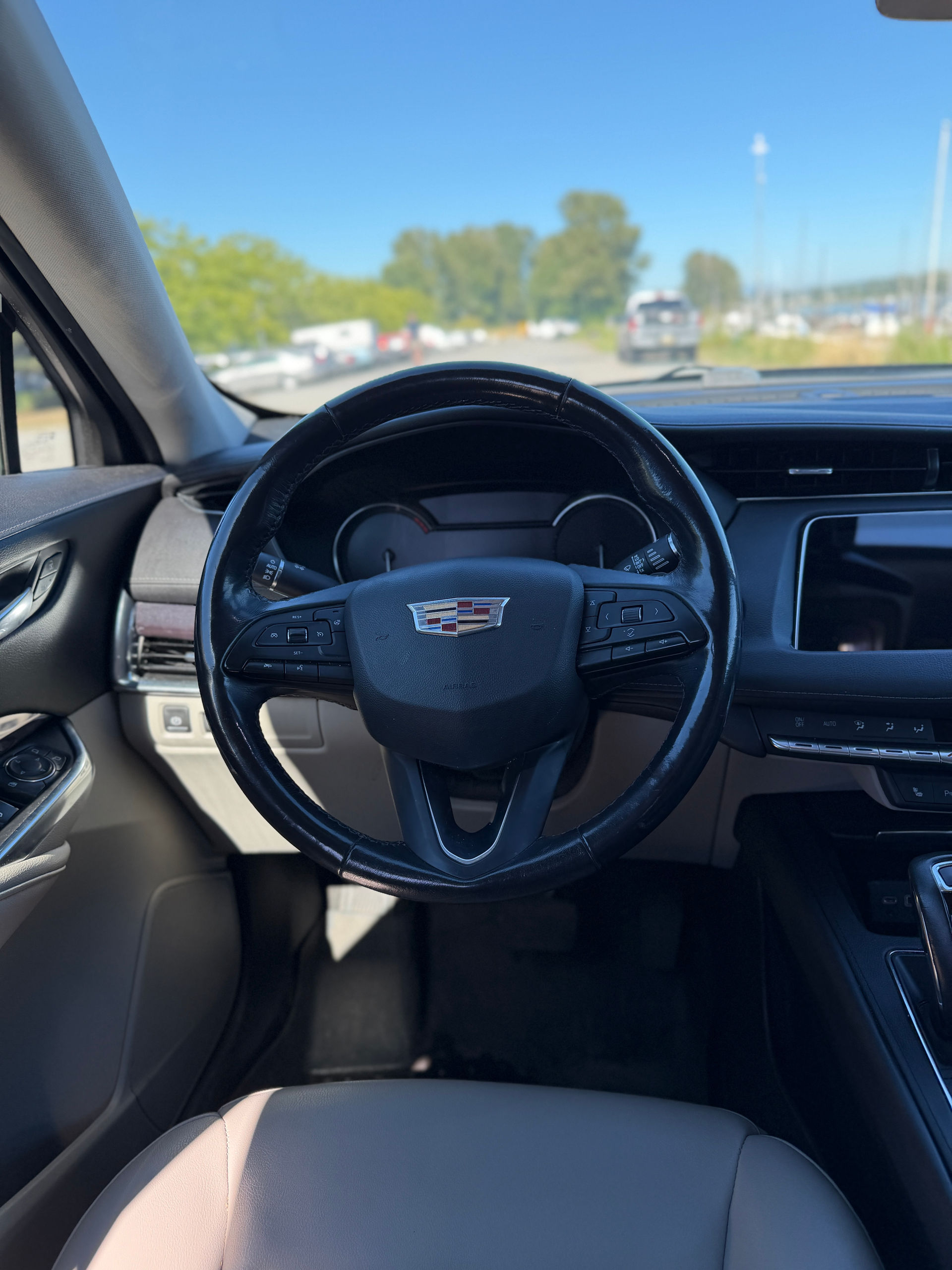
Pick a scene, a shape and the words. Your car stays as shot. A cabin or close-up photo keeps its view.
scenes, from studio to snow
17
shapes, one for every feed
5
photos in a carousel, plus an end slide
5
versions of a photo, to pick from
3
credit a post, down from 1.5
1

Build a post

Real photos, real words. Change anything.

Make a

Tag

Shape

Square: Instagram and Facebook feed

Your numbers, exact. Price and kilometres print from what you type, the way buyers read them. AI never writes them.

Try it free

17 scenes to start from.

The post above uses a dealer’s photo, as shot. Each scene is made by AI and labeled.

Text

Your words, exactly right.

StudioOS sets them, not the AI. Every number is yours.

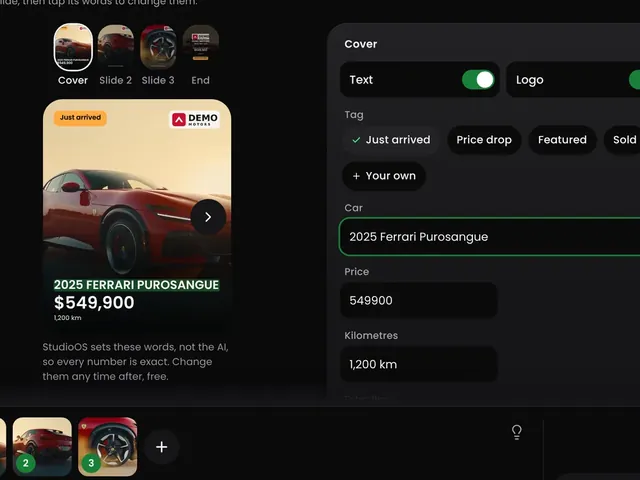
The Text canvas on a carousel’s cover: the tag Just arrived, the car 2025 Ferrari Purosangue, the price 549900 and 1,200 km typed beside the slide, which prints $549,900.
  • A tagJust arrived, Price drop, Featured, Sold, or your own.
  • The car and its priceThe was price, kilometres and stock number too. Printed the way buyers read them.
  • Up to 3 featuresOne owner, Low km, AWD and more. Or write your own.
  • Change it any timeTap the words on the picture. Change them after, free.

Try it free

Carousels

Every slide, its own words.

2 to 5 photos of one car, one post people swipe.

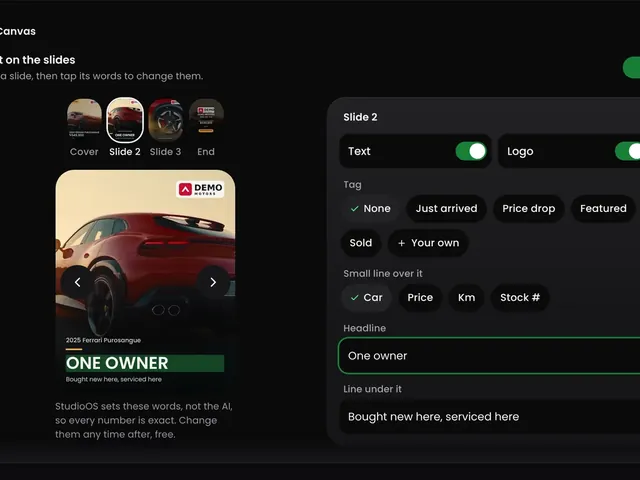
The Text canvas on slide 2 of a carousel of a red 2025 Ferrari Purosangue: its own headline, One owner, typed beside it, with switches for its text and its logo.
  • Its own headlineTap a slide, then type. Or tap an idea.
  • The picture aloneTurn Text off on any slide.
  • Logo on or offSlide by slide.
  • Portrait or squareThe two shapes a feed keeps a carousel in.
End slide

End on your details.

Your name, number and logo close the carousel. Free.

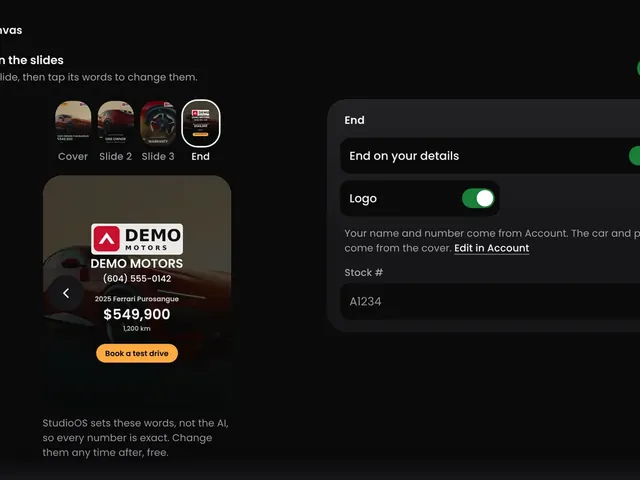
The end slide of a carousel: End on your details switched on, the Demo Motors logo, name and number from Account, the car and price from the cover, and a stock number.
  • From your accountYour name, number and logo, set once.
  • The car and its priceTaken from the cover, so they match.
  • A stock numberAdd it, or leave it out.
  • FreeThe end slide costs no credits.
Your plate

Your name on the plate.

Your logo and name, or your own plate, in place of the car’s.

Your plate, in Account: the name Demo Motors over Vancouver beside the Demo Motors logo on a white plate, with its four text designs, Bold, Wide, Lined and Simple, and a choice of side by side or stacked.
  • Your logo or your plateUse your logo, or upload a plate. Black, white or grey.
  • Your name beside itFour text designs. One line or two.
  • Drag and size eachThe logo and the name. The frame is the plate.
  • Pick YoursUnder Plate, on a post or a reel.

Set up your plate

Post options

The finishing touches.

Versions and the background. A tap each.

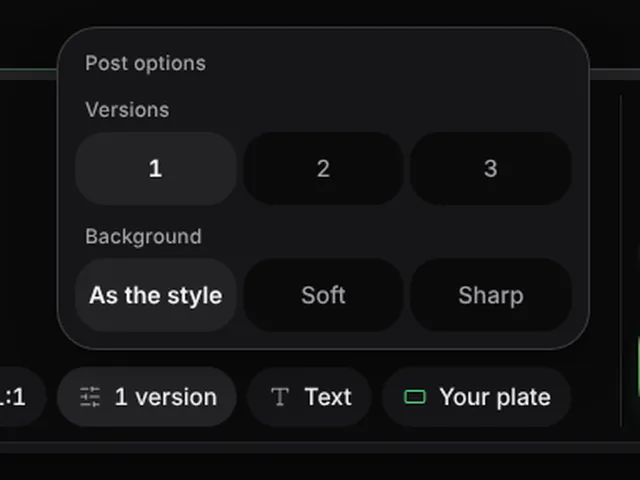
Post options over the create bar: one, two or three versions, and the background as the style has it, soft or sharp. In the bar, a front three-quarter photo of a red 2025 Ferrari Purosangue and the chips Studio, Presenter, Carousel, 1:1, 1 version, Text and Your plate, with Create photo at 1 credit, down from 1.5.
  • Versions1 to 3 of the same photo. Each is its own post, and its own credits.
  • The backgroundAs the style has it, soft, or sharp.
After it is made

Ready to post.

Download it, caption it, keep it with the car.

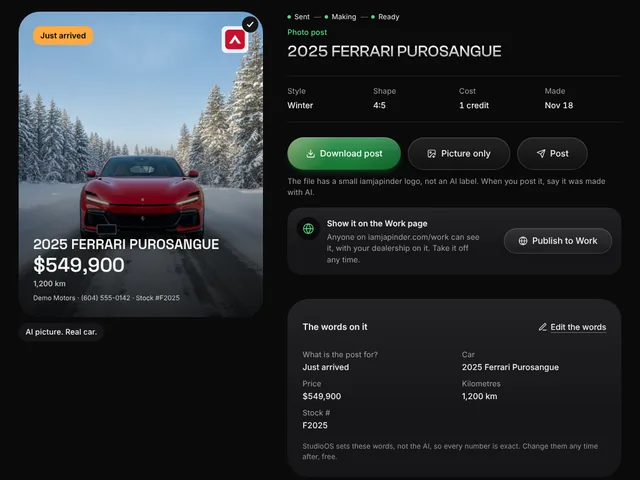
A finished photo post of a red 2025 Ferrari Purosangue, front view on a snowy forest road, with Just arrived, the Demo Motors logo, $549,900, 1,200 km and the dealer’s name, number and stock number on it, labelled AI picture, real car. Beside it: Winter, 4:5, 1 credit, Download post, Picture only, Post, Publish to Work and the words on it.
  • DownloadThe post, or the picture alone. A carousel comes as one zip.
  • Captions for Instagram and FacebookWritten for you when you post, in your voice. Free.
  • ProjectsEach car’s posts and reels, together.
  • The Work pagePublish it to iamjapinder.com/work, if you like.

How Projects work

Price

A credit a post.

Down from 1.5, until Nov 30. Any scene, any shape.

  • 1 creditA post, or a page of a carousel.
  • FreeThe end slide with your details.
  • $19Unlimited photo posts for 3 hours. Needs a plan or Lifetime.
See pricing

Credits come back on their own if a post fails, or if no edit stays true to your photo.

Goes with this.

See StudioOS

DealerOS

Clean photos on your website too?

Clean backgrounds on your own photos.
Free for a month. No card.

Support

Questions about posts.

  • No. StudioOS sets the price, the kilometres and every word. The AI makes the scene. Your numbers print as you type them.

  • No. StudioOS keeps your car as shot. A dashboard photo stays a dashboard. Each picture is checked against your photo. No true edit in 3 tries? You get your photo back, and its credits.

  • 17, in 4 groups: Studio, Outdoors, City and Your lot. From a dark studio to fresh snow.

  • Square 1:1, Portrait 4:5, Listing 4:3, Vertical 9:16 and Wide 16:9. A carousel is portrait or square.

  • Up to 9 of one car. A carousel uses 2 to 5 of them, a slide each, then your end slide.

  • Yes. In Create, tap +, then Listing link. Paste the car’s page and pick its photos. Its name, price, kilometres and stock number can fill in too. Nothing you typed is replaced.

  • Yes, any time, free.

  • Yes, free. Tap Post on the post. A caption and hashtags are written for that car, in your voice. Edit it, then copy it.

  • Yes. Pick Vertical 9:16. The words stay clear of the top and bottom, where Instagram puts its own. Supercomputer can plan them for you.

    About Supercomputer

  • Yes. Under Plate pick Blank, or Yours to show your own plate.

    Set up your plate

  • Yes. Under Presenter, pick one of seven ready presenters. Adding one is free, and the post costs the same. They pose beside the whole car, labeled as AI. Close-ups and the inside stay without one.

    Meet your presenter

  • Yes, wherever StudioOS shows it. The download carries a small iamjapinder logo, not an AI label, so say it was made with AI when you post it. The caption StudioOS writes says Made with AI.

    How we use AI

Try it on one car.

20 free credits. No card.

Our AI team picks up any time and sorts most things on the spot. Japinder gets every message.